
How to Set Your Availability
Your availability tells roster builders when you can and prefer to work.
- Go to My Availability (Sidebar → My Availability)
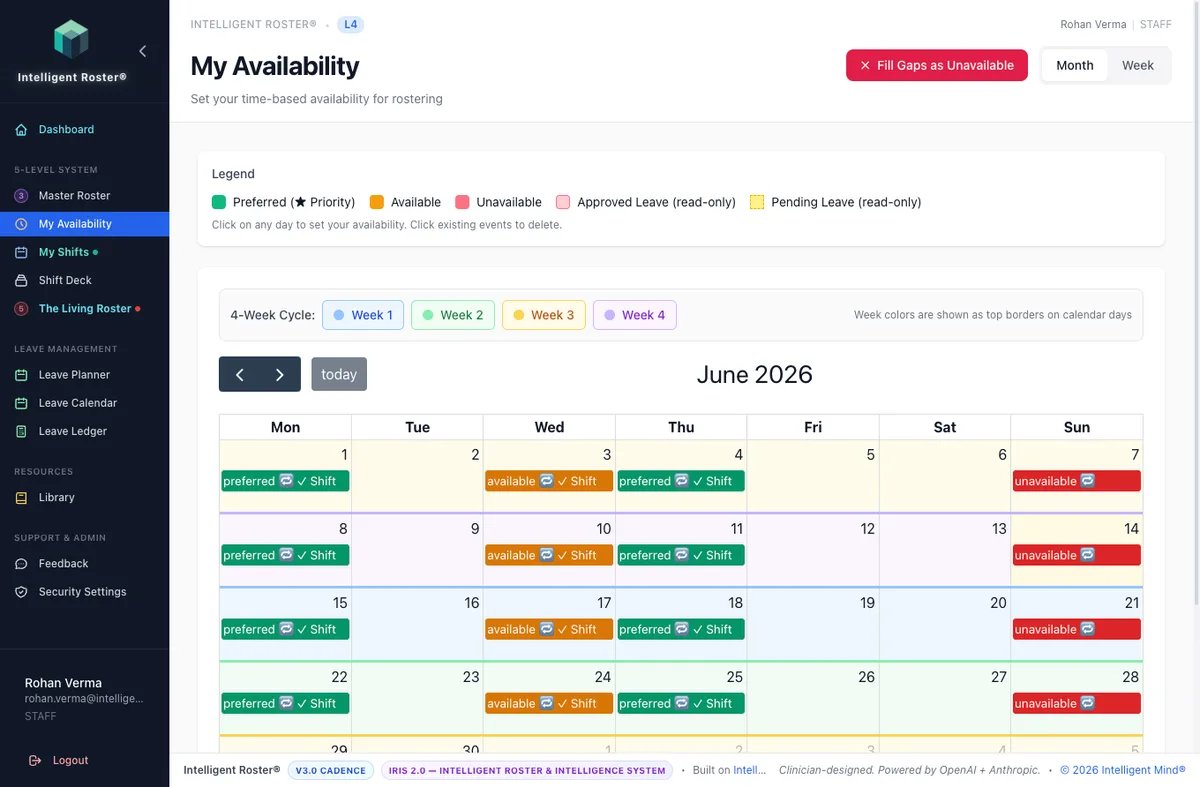
- You'll see a calendar view
- Click on a date to set your status:
- 🟢 Available – you can work this day
- ⭐ Preferred – you'd like to work this day (prioritized by AI)
- 🔴 Unavailable – you cannot work this day
- For partial days, set specific time ranges (e.g., available mornings only)
- Changes save automatically
Who needs to set availability?
| Persona | What to do |
|---|---|
| Flexible schedule / wants extra shifts | Set Available or Preferred on days or times you want work |
| Fixed master roster, pattern hours only | Optional — ignore reminders; Unavailable and leave are what actually change assignment on your pattern |
| Rare ad-hoc swap | Use Direct Swap from My Shifts — not My Availability |
If you work from a fixed master roster and are not seeking any additional shifts, you may ignore availability prompts. Your baseline pattern comes from Level 3: Master Roster. Available or Preferred on your regular pattern slots is harmless once master roster is applied — but Unavailable and approved leave are what cause those dates to be skipped.
Tips:
- Set your availability well in advance (at least 2 weeks ahead) if you actively use it
- The AI roster generator uses your preferences when building rosters
- On a fixed master roster: Unavailable and approved leave skip dates on your pattern; Available/Preferred on pattern slots won't change your baseline
- Preferred on other days or times can still help if you want extra shifts beyond your baseline
- Roster builders can see your availability when making assignments
- Setting unavailable doesn't guarantee you won't be rostered – it's a preference, not leave