
How to Read the Living Roster
The Living Roster is the main roster view showing all staff assignments.
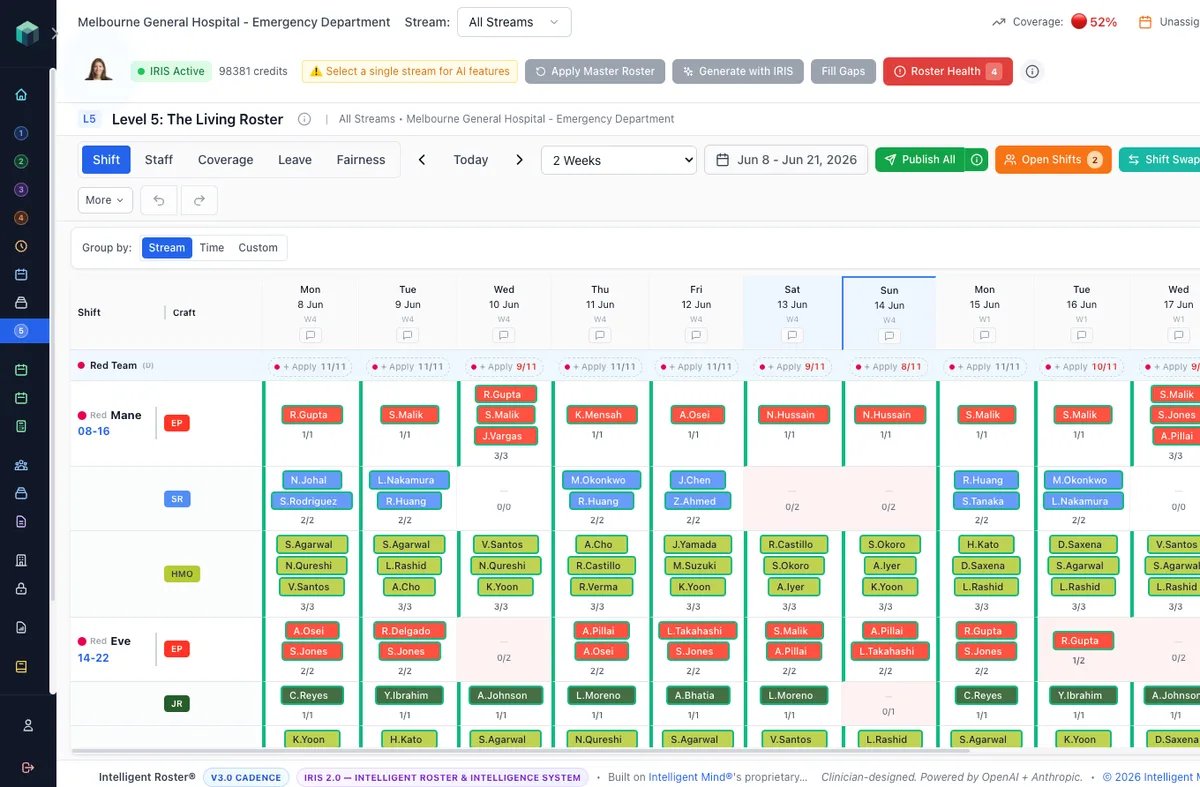
- Go to The Living Roster (Sidebar → The Living Roster)
- Select your stream/department from the dropdown
- The grid shows: Staff names on rows, Dates on columns
- Each cell shows the shift assignment (AM, PM, Night, etc.)
Color codes:
- Regular assignment – standard color
- 🟣 Purple – AI-generated (pending review)
- ⚠️ Yellow/Orange – has a warning (rule violation)
- 🔴 Red – conflict or issue
- Empty cell – no assignment (potential gap)
Navigation:
- Use ◀ / ▶ arrows to move weeks
- Click Today to jump to current week
- Use the week picker to jump to any week
- Scroll horizontally for more dates
- Scroll vertically for more staff
View modes: Staff View, Coverage View, Shift View, Leave View