
Bulk Approving and Declining Open Shift Requests
Bulk Approval on the Shift Deck
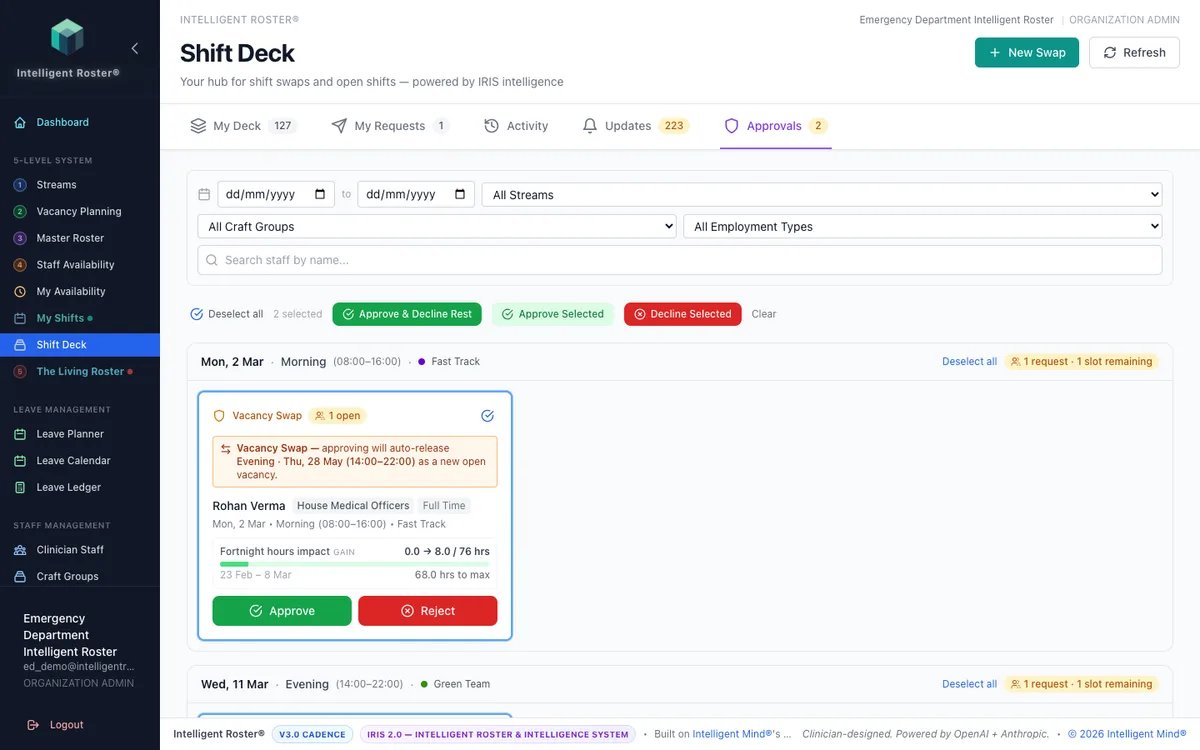
The Approvals tab on Shift Deck supports faster bulk actions for open shift requests. The same bulk actions are also available on Living Roster → Open Shifts pane → Requests.
Shift swaps with multiple open offers must still be approved individually (pick the correct offer) — in either Shift Deck → Approvals or Living Roster → Shift Swaps pane → Pending Approval.
Bulk actions available
Select multiple pending items using the checkboxes, then choose:
- Approve & Decline Rest — Approves your selected requests and automatically declines all other pending requests for the same vacancy. Use this when you've picked the staff you want and need to notify everyone else.
- Approve Selected — Approves only the selected requests without affecting others. Use this when the vacancy has multiple slots and you want to approve some now and decide on others later.
- Decline Selected — Declines the selected requests.
Smart handling
- Open swaps with multiple offers are automatically skipped during bulk approval — you need to approve those individually to choose the correct offer
- Vacancy requests use an atomic bulk API — all approvals happen in one operation for consistency
- Other staff whose requests are auto-declined or expired receive a notification explaining why
Where to find it
Open shift bulk actions:
- Shift Deck → Approvals tab, OR
- Living Roster → Open Shifts pane → Requests tab
Then select items using checkboxes and use the bulk action buttons at the top.
Tip: "Approve & Decline Rest" is the fastest way to fill a single-slot vacancy — pick one person and everyone else is notified automatically.