
How to Request a Direct Shift Swap
Step by step:
- Go to My Shifts (Sidebar → My Shifts)
- Find the shift you want to swap
- Right-click the shift → select Request Swap
- In the swap modal, select Direct Swap
- Choose the colleague you want to swap with (the system filters to eligible colleagues in your craft group)
- Select which of their shifts you want in return — or leave blank for a one-way transfer (you give up your shift, they take it). Their shifts are grouped by fortnight (Your shift's fortnight, Earlier, Later) — see Why the Swap Modal Only Shows One Fortnight at a Time if you don't see every option at first
- Add a message (optional) and submit
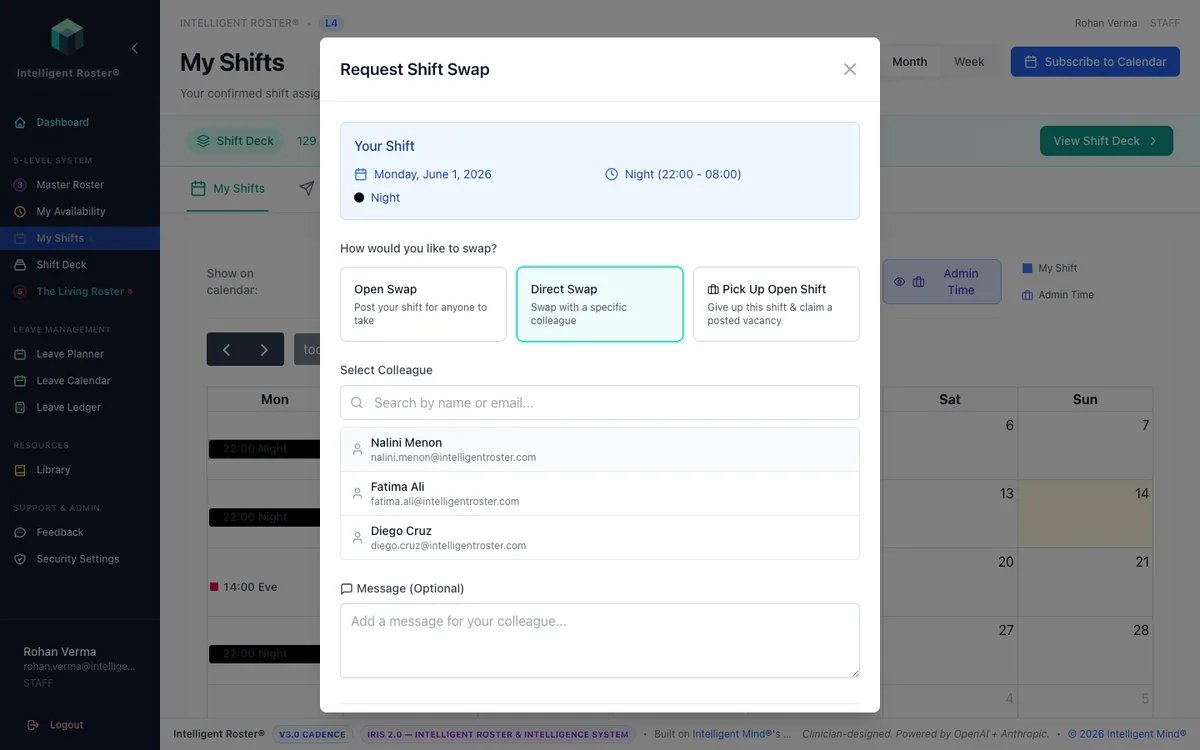
What happens next:
- Your colleague receives a notification
- They review the swap details and click Accept or Decline
- If accepted, it goes to a roster builder for final approval
- Once approved, the roster updates automatically and both of you are notified
Tips:
- Talk to your colleague first to make sure they're willing
- The system checks eligibility automatically — craft group match, scope requirements, leave conflicts, rest periods, consecutive-day limits, and fortnight-hours bands
- The swap modal shows a live Fortnight hours impact bar for both you and the colleague — same numbers admins see during approval. Cross-fortnight swaps display one bar per affected fortnight, labelled
gainandloss - You can cancel a pending request from Shift Deck → My Requests before it's accepted, or from the My Requests overlay on the My Shifts calendar
- You can also do a one-way transfer if you just need someone to cover your shift without getting one of theirs in return
- Only see shifts in one fortnight? Use Load earlier fortnight / Load next fortnight (Pick Up Open Shift tab) or expand Earlier / Later (Direct Swap) — full explanation