
How to Request an Open Shift (Pick Up a Vacant Shift)
How to Request an Open Shift
Open shifts are vacant shifts that need to be filled. You can browse and request them from the Shift Deck or My Shifts calendar.
From the Shift Deck
- Go to Shift Deck (Sidebar → Shift Deck)
- On the My Deck tab, scroll to Open Shifts
- You'll see shifts you're eligible for (matching your craft group and scopes)
- Click Request Shift on the one you want
- Review the shift details and any compliance warnings
- Submit your request
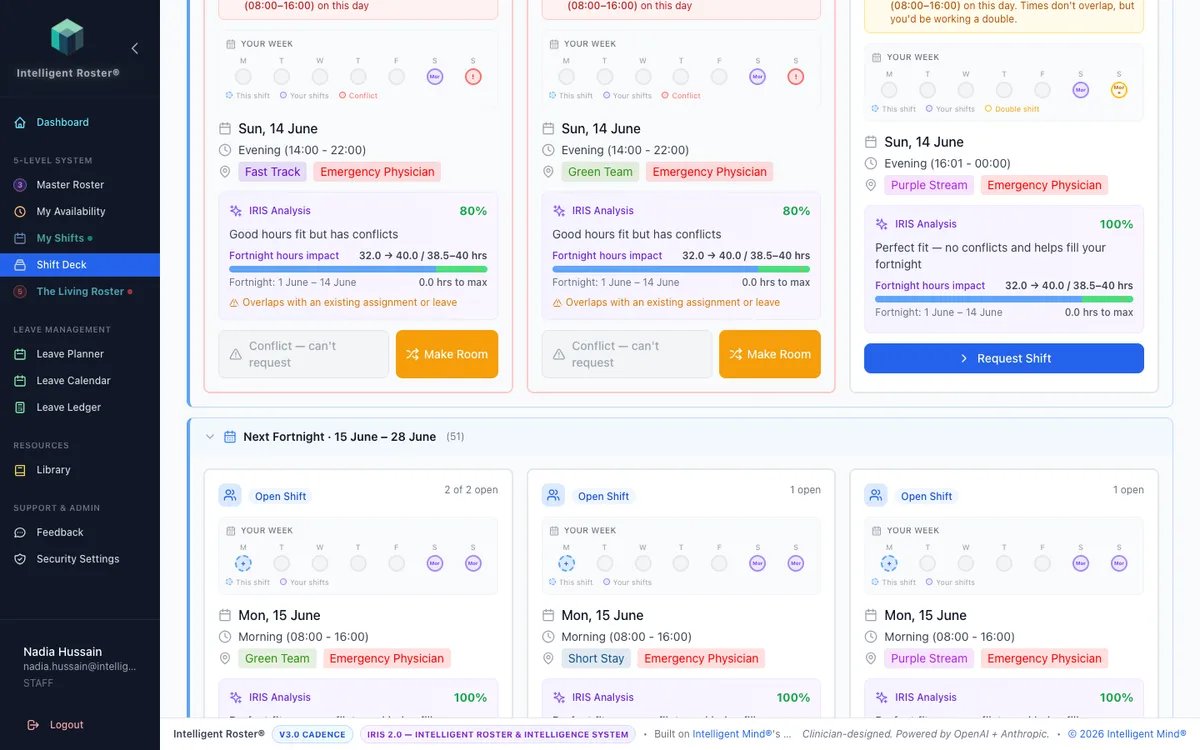
Browse All mode: Toggle Browse All Open Shifts at the top to see ALL open shifts across the organisation – including ones outside your craft group. You can filter by craft group, scope, and stream. Shifts outside your qualifications show a warning, and you'll need to provide a justification.
From My Shifts (Calendar View)
- Go to My Shifts (Sidebar → My Shifts)
- Toggle on the Open Shifts overlay (shows vacant shifts as translucent orange blocks)
- Click on an open shift
- Review the details and submit your request
From The Living Roster (Staff tab)
- Go to The Living Roster → Staff tab
- Turn on My Opportunities on the toolbar
- Click an orange Open · … pill on your row
- Review the Opportunity modal (fortnight impact, IRIS compatibility) and click Request This Shift
See My Opportunities on Staff View for the full walkthrough.
Tip: Toggle on the My Requests overlay instead (Show on calendar → My Requests, next to Open Swaps) to see your own pending open-shift requests and open-swap offers as yellow markers directly on the calendar — without needing the Open Shifts overlay on. Click a marker to view details and withdraw inline.
What happens next
- Your request goes to Pending status
- A roster builder reviews it in their Approvals tab
- If approved, you're assigned to the shift and your roster updates
- If declined, you'll be notified with a reason
- Track your requests in Shift Deck → My Requests tab under "Open Shift Applications", or on the My Shifts calendar via the My Requests overlay
Out-of-Qualification Requests
If you request a shift that doesn't match your craft group or scopes:
- The system flags it as an out-of-qualification request
- You'll need to provide a justification explaining why you can work this shift
- The roster builder must explicitly acknowledge the mismatch before approving
Tips
- Open shifts show an IRIS compatibility score — higher scores mean a better match
- Check for compliance warnings (overtime, rest periods) before requesting
- You can withdraw a pending request from Shift Deck → My Requests, or from the My Requests overlay pin on the My Shifts calendar, if you change your mind