
Shift Swaps and Open Shifts Overview
Shift Swaps & Open Shifts
There are three ways to manage your shifts through the Shift Deck:
1. Direct Swap
Exchange a specific shift with a specific colleague. You choose the colleague, they accept or decline, then a roster builder gives final approval.
2. Open Swap
Post your shift for anyone qualified to take. Interested colleagues click Take This Shift, and a roster builder approves.
3. Open Shift Request (Pick Up a Vacant Shift)
Browse vacant shifts that need to be filled and request one. The system checks your qualifications automatically. A roster builder approves and you get assigned.
Where to go: Sidebar → Shift Deck to see everything in one place, Sidebar → My Shifts to initiate swaps or view open shifts on your calendar, or The Living Roster → Staff tab → My Opportunities to spot eligible open shifts and swaps on the grid (My Opportunities on Staff View).
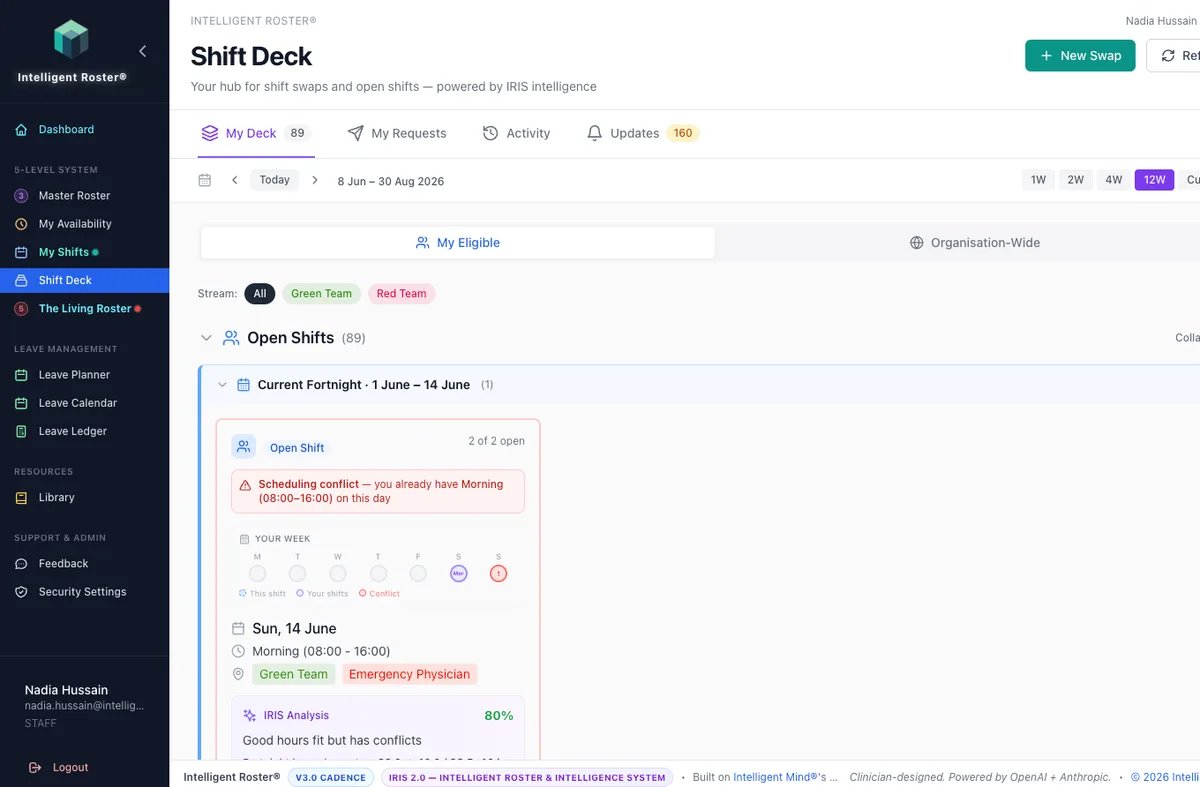
Shift Deck tabs:
- My Deck – Action required items, available swaps, and open shifts you're eligible for
- My Requests – Track your outgoing swap requests and open shift applications
- Activity – History of completed swaps and shift pickups
- Updates – Your notifications
Key rules:
- Both staff must be in the same craft group (e.g., both RNs)
- The person taking the shift must have the required scopes
- Neither person can be on leave or already assigned on that date
- Rest period and max-hours rules are automatically checked
- A roster builder must approve before the change takes effect