
The Intelligence Bar — Apply Master Roster and Fill Gaps
The Intelligence Bar
The Intelligence Bar is the horizontal action bar near the top of The Living Roster page. It contains the key actions for fast roster building:
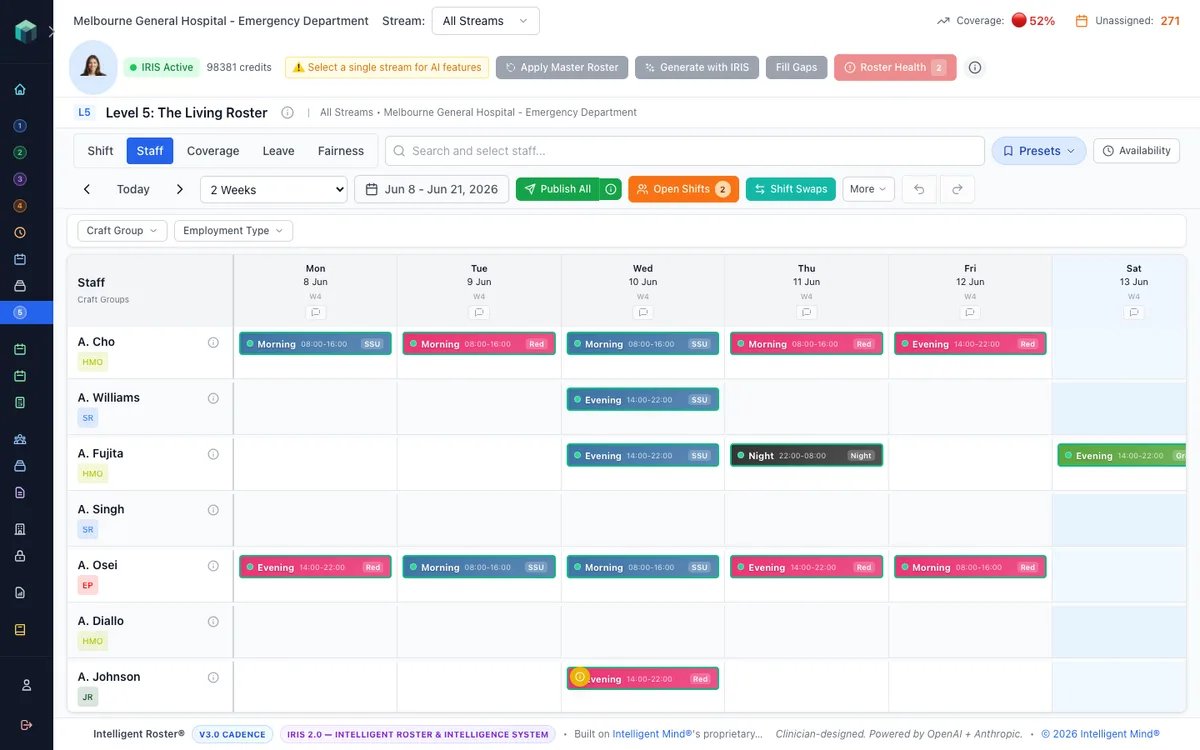
Stream selection
Before using any IRIS action, select which streams to work on using the stream picker in the Intelligence Bar. You can choose:
- One stream — e.g. Green Team only
- Multiple streams — check several streams to process together
- All Streams — run across the entire department
All three IRIS actions — Apply Master Roster, Generate with IRIS, and Fill Gaps — respect your stream selection. When multiple streams are selected, modals show "N streams" in the header.
Apply Master Roster
Stamps your Master Roster templates onto the live roster for a selected date range.
- Go to The Living Roster (Sidebar → The Living Roster)
- Select the stream(s) you want to apply
- Click Apply Master Roster in the Intelligence Bar
- Select the date range and review the preview
- Click Apply — IRIS copies all repeating patterns from your Master Roster
This gives you your baseline roster in seconds — all the regular assignments (who always covers Triage on Mondays, who always does the Night shift on Tuesdays) are placed automatically.
When multiple streams are selected, the preview is aggregated across all streams and apply runs sequentially per stream to avoid cross-stream double-booking.
Fill Gaps (IRIS Tactical Mode)
After applying the master roster, there will usually be gaps (staff on leave, new hires without patterns, etc.).
- Select the stream(s) you want to fill
- Click Fill Gaps in the Intelligence Bar
- Choose the date Scope, and optionally expand Scope this run to limit the pool (craft group, employment type, or specific staff)
- Click Scan gaps — nothing runs until you click, so you can set scope/filter first. IRIS then scans only unfilled vacancy slots — it does not reshuffle existing assignments
- Review ranked suggestions by priority tier and apply the ones you want
Fill Gaps uses a different algorithm to Generate with IRIS: tactical, coverage-first, and partial-availability aware. See the full guide: Fill Gaps — IRIS Tactical Mode.
Generate with IRIS
Click Generate with IRIS to build or rebuild a roster for the selected period and stream(s). See How to Generate a Roster with IRIS for the full preview and availability workflow.
Workflow: Apply Master Roster → Generate with IRIS → Fill Gaps → Roster Health → Publish.
Where to find it: The Intelligence Bar appears at the top of The Living Roster page when you're in Staff View.